
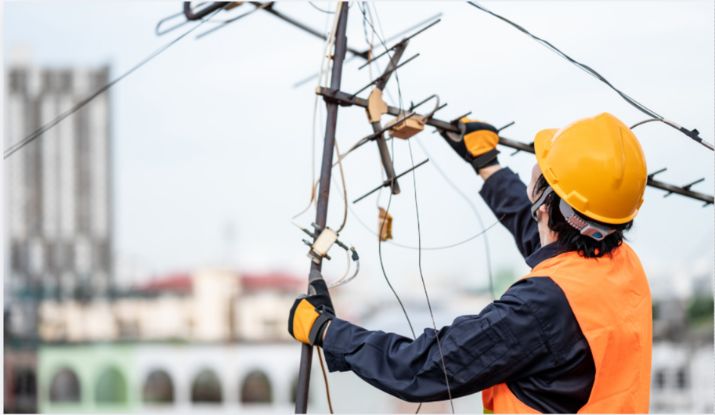
Is your TV showing pixelated images, dropping channels, or displaying the dreaded “no signal” message? You’re not alone. TV antenna problems are one of the most common call-outs we handle across Melbourne — and the good news is most faults come down to just a handful of causes.
In this guide, we walk through the 8 most common reasons your TV antenna stops working, how to identify each one, and whether it’s a DIY fix or something that needs a licensed technician.
Short on time? If your antenna has stopped working and you need it fixed today, call Metro TV Antenna for a same-day TV Antenna repair in Melbourne. We cover Melbourne and all across the suburbs.
The quick checklist before you do anything else
Before assuming it’s an antenna fault, run through these fast checks:
- Is the TV set to the correct input? Press the Input or Source button and select “Antenna” or “TV” — not HDMI.
- Have you re-scanned for channels? Go to Settings → Channel Setup → Auto Scan. New transmitter changes sometimes drop channels unless you rescan.
- Is the coaxial cable plugged in firmly at the back of the TV? A loose cable is the #1 misdiagnosed “antenna fault.”
- Is there a storm or extreme weather? Signal degradation during rain is normal and usually resolves on its own.
If none of those solve it, read on — one of the 8 problems below is almost certainly your issue.
Problem 1: Damaged or ageing antenna
Symptoms: Poor reception across all channels, picture breaks up, complete signal loss.
TV antennas are built for the outdoors, but they don’t last forever. Exposure to Melbourne’s weather — summer heat, strong winds off Port Phillip Bay, and stormy winters — causes antennas to corrode, warp, and eventually fail. Most antennas have a lifespan of 10–15 years.
Signs your antenna is physically damaged:
- Bent or broken elements (the horizontal arms of the antenna)
- Visible rust or corrosion on metal parts
- The antenna has shifted or is pointing in the wrong direction after a storm
DIY or professional? You can inspect the antenna from ground level, but repairs and replacements should be handled by a licensed technician. Working on roofs without proper equipment is dangerous, and an incorrectly installed replacement antenna will underperform.
Problem 2: Loose or corroded cable connections
Symptoms: Intermittent signal that comes and goes, channels dropping out randomly.
The coaxial cable running from your antenna to your TV degrades over time. The connections at each end — at the antenna, at any wall outlets, and at the TV itself — are common failure points. Corrosion, moisture ingress, or simply a connection that has worked itself loose can cause exactly the frustrating “sometimes works, sometimes doesn’t” experience.
Where to check:
- The cable connection at the back of your TV or set-top box
- Any wall plate outlets the cable passes through
- The connection point at the antenna itself (requires roof access)
DIY or professional? You can check and retighten the TV-end connection yourself. Anything involving the roof, wall cavities, or the antenna connection point requires a licensed cabler.
Problem 3: Signal interference
Symptoms: Pixelation at certain times of day, reception worse in specific rooms, channels that worked fine now drop out.
Melbourne’s dense suburban environment creates a lot of sources of signal interference:
- 4G and 5G mobile towers — the frequency ranges used by mobile networks can bleed into TV signal frequencies, particularly after network upgrades in your area.
- Tall buildings and new construction — a new apartment block near you can create a shadow zone that blocks the signal path from the transmitter.
- Trees and vegetation — trees that have grown significantly over the years can block line-of-sight to the transmitter, especially after storms add mass to the canopy.
- Electrical interference — some appliances, LED lights, and solar inverters generate electrical noise that affects antenna signal.
DIY or professional? Diagnosing interference requires signal measurement equipment. If you suspect this is the cause, a technician can run a signal sweep and identify the source.
Problem 4: Faulty or incorrectly configured amplifier
Symptoms: Weak signal on all channels, or paradoxically — signal so boosted it causes pixelation (“too much signal” is a real problem).
Amplifiers are used to boost signal strength when it’s weak, or when the antenna signal is split across multiple TVs. A faulty amplifier, or one that’s set to the wrong gain level, can actually make reception worse rather than better.
Common amplifier issues:
- The amplifier has failed and is no longer boosting signal
- Over-amplification causing signal overload (distorted or pixelated picture)
- The amplifier power supply (usually a plug-pack) has failed
- The amplifier is installed incorrectly in the signal chain
DIY or professional? Check that the amplifier’s power supply is plugged in and its indicator light is on. Beyond that, testing amplifier gain and configuration requires equipment.
Problem 5: Water damage in the cable run
Symptoms: Signal that was fine before a rain event, gradual deterioration over months, intermittent issues that worsen in wet weather.
Water finding its way into coaxial cable — through damaged insulation, exposed roof penetrations, or poorly weatherproofed connectors — causes the cable to degrade from the inside out. Once water is inside the cable, it wicks along the length of the run and corrodes the copper core. This damage is often invisible from the outside.
Signs of water ingress:
- Problems started or worsened after a rain event or storm
- Reception gets worse in wet weather and better when dry
- Visible moisture or condensation in antenna wall plates
DIY or professional? Water-damaged cable runs need to be replaced entirely. A technician will run a new cable, weatherproof all entry data points, and seal the roof penetration.
Problem 6: The antenna is pointing the wrong direction
Symptoms: Weak signal or complete loss of certain channels, despite the antenna appearing undamaged.
Melbourne’s main TV transmitter is located on Mount Dandenong in the Dandenong Ranges. Your antenna needs to be pointed toward this transmitter to receive the strongest signal. Storms, high winds, or even vibration over time can cause antennas to rotate on their mounting bracket — even a few degrees of misalignment can cause noticeable signal loss.
How to tell if this is the issue: Look up at your antenna from the ground. Compare the direction it’s pointing to neighbouring antennas in your street. If yours is significantly out of alignment with the others, misalignment is likely the cause.
DIY or professional? Realigning an antenna safely requires roof access and ideally a signal meter to confirm you’ve found the optimal direction.
Problem 7: Faulty splitter
Symptoms: One TV works fine, others in the house have poor or no signal.
If your antenna signal is split to feed multiple TVs or rooms, a passive splitter is dividing the signal power. Each split reduces signal strength. A faulty splitter, a splitter with too many outputs for your signal level, or a damaged splitter can cause signal loss on some or all of the connected TVs.
How to test: Temporarily connect the antenna cable directly to the TV that has the problem, bypassing the splitter entirely. If reception immediately improves, the splitter (or distribution amplifier) is the cause.
DIY or professional? Swapping a splitter is a straightforward fix if it’s accessible. If it’s in the roof space or wall cavity, a technician is safer and faster.
Problem 8: Wrong antenna type for your area
Symptoms: Consistently poor reception since moving in, or poor reception after switching from a different provider or location.
Not all antennas are equal, and not all antennas work equally well in every Melbourne suburb. The distance from the transmitter, local terrain, and nearby structures all affect which antenna type and gain rating is appropriate for your location.
Common mismatch scenarios:
- A low-gain antenna installed in a suburb with a weak signal (too far from the transmitter or obstructed)
- A high-gain antenna causing overload in a suburb with a very strong signal
- An old antenna designed for analogue TV that underperforms with digital signals
DIY or professional? Selecting and installing the right antenna for your specific location requires knowledge of Melbourne’s signal coverage map and hands-on testing. A correctly specified antenna makes a significant difference to long-term reception quality.
When to call a professional antenna technician
Call a technician if:
- Your antenna is more than 10–15 years old
- Reception problems started after a storm or strong wind event
- You’ve tried the basic checks above and the problem persists
- Reception is intermittent or getting progressively worse
- You’re having issues in multiple rooms
Signs it needs immediate attention:
- Complete loss of signal on all channels
- Antenna visibly damaged, tilted, or displaced
- Burning smell near the amplifier power supply
Frequently asked questions
How much does TV antenna repair cost in Melbourne?
Most TV antenna repairs in Melbourne cost between $90 and $280 depending on the fault. Simple cable or connector issues start from around $90. Full antenna replacement typically costs $180–$350. A technician can give you an accurate quote after inspecting the fault.
Can I repair my TV antenna myself?
Basic checks like tightening the TV-end cable connection or rebooting your set-top box are safe to DIY. However, anything involving roof access, cable runs, or the antenna itself should be handled by a licensed cabler. Roof work without proper safety equipment is a genuine risk, and poorly installed repairs can make the problem worse.
How long does a TV antenna repair take?
Most repairs are completed in 1–2 hours on-site. More complex jobs involving cable replacement through walls or roof spaces may take up to 3 hours. Metro TV Antenna offers same-day bookings across Melbourne.
Is it better to repair or replace my TV antenna?
If your antenna is under 8–10 years old and the damage is minor (misalignment, loose connection, failed amplifier), repair is usually the better value. If the antenna is older, significantly corroded, or has sustained storm damage, a full replacement often costs only marginally more than repair and gives you a fresh 10–15 year lifespan.
Why does my TV signal drop out in bad weather?
Some signal fluctuation during heavy rain or storms is normal — water in the atmosphere absorbs signal. However, if your reception significantly worsens in wet weather or takes days to recover after a storm, this often indicates water ingress in the cable or a partially damaged antenna that’s only borderline functional in ideal conditions.
How do I know if my antenna or my TV is the problem?
Connect a different TV or set-top box to the same antenna cable. If the problem follows the TV (not the cable), the TV tuner is at fault. If the second device has the same problem, the antenna or cable is the cause.
Need a TV antenna repair in Melbourne?
Metro TV Antenna provides professional TV antenna repairs across Melbourne and surrounding suburbs — including Bentleigh, Brighton, St Kilda, Sunbury, and everywhere in between.
- Same-day bookings available
- Licensed and insured technicians
- 12-month workmanship guarantee
- Free quote before any work begins
Book your antenna repair today → 0421 094 024
Or call us directly to speak with a technician about your specific situation.